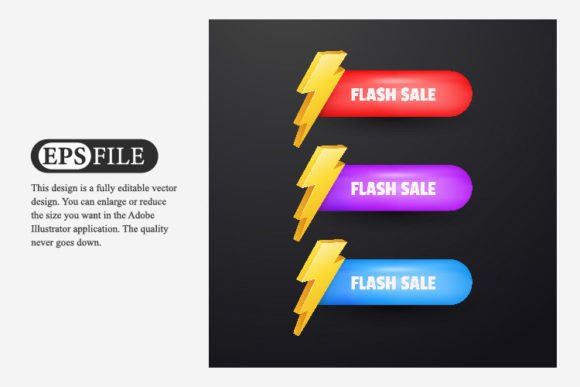
3D Flash Sales Label Ribbon for Product
The 3D Flash Sales Label Ribbon for Product is a visually striking design element that adds a sense of urgency and excitement to your product displays. Whether you're running an online store, designing marketing materials, or creating content for social media, this label can help draw attention to limited-time offers, discounts, or new arrivals. It's crafted using Adobe Illustrator, making it highly customizable and easy to integrate into various design projects.
What Makes This Design Unique?
One of the standout features of the 3D Flash Sales Label Ribbon is its dimensionality. Unlike flat text or basic banners, this ribbon appears as though it's physically hanging off the product, giving it a more dynamic and eye-catching look. The use of shadows, gradients, and perspective makes it feel lifelike and engaging — perfect for capturing viewer interest in fast-moving digital spaces like e-commerce websites or promotional emails.
Key Features You'll Get
- EPS files for Adobe Illustrator: These vector-based files allow for seamless editing and scaling without any loss in quality. Ideal for professionals who need flexibility in their designs.
- JPG Preview included: A high-resolution image gives you a quick visual reference before diving into the editable file. Great for beginners or those working with non-illustration software.
- RGB Color format: Ensures vibrant, accurate colors across digital platforms. Perfect for web use where color consistency matters.
- High-quality design: Clean lines, professional typography, and modern aesthetics make it suitable for both personal and commercial applications.
Why Use a 3D Flash Sales Label?
Visuals play a huge role in consumer behavior, especially when it comes to sales. A well-designed sales ribbon can increase conversion rates by highlighting special deals or promotions. The 3D effect helps products stand out in a crowded marketplace, whether on a website, app, or printed catalog.
For small business owners and marketers, this label ribbon provides an efficient way to communicate important information quickly. Instead of writing lengthy descriptions, a bold "Sale" or "Flash Deal" banner right on the product image tells customers everything they need to know at a glance.
Realistic Use Cases
Here are some practical examples of how the 3D Flash Sales Label Ribbon can be used:
- E-commerce Websites: Overlay the ribbon onto product images during seasonal sales or clearance events to highlight discounted items.
- Social Media Marketing: Add it to Instagram posts, Facebook ads, or Pinterest pins to emphasize flash sale dates and prices.
- Email Newsletters: Showcase featured products with the ribbon to encourage clicks and purchases.
- Printed Materials: Use it in flyers, brochures, or posters to create a polished, professional look while promoting deals.
- YouTube Thumbnails & Pre-Roll Ads: Make your video content pop by including the ribbon in thumbnails or short ad visuals to attract views.
Who Can Benefit from This Design?
This design isn’t just for graphic designers or large corporations. Its user-friendly nature makes it accessible to a wide range of users:
- Beginners: With clear instructions and JPG previews, even those new to design can use it effectively.
- Creative Professionals: Freelancers and in-house designers will appreciate the clean, scalable vectors for quick project turnaround.
- Entrepreneurs: Boost your brand’s visual appeal with minimal effort during key sales periods.
- Bloggers and Influencers: Incorporate the label into blog headers or sponsored content to promote affiliate links or limited offers.
- Small Business Owners: Create cohesive branding for sales campaigns without hiring a full-time designer.
- Online Retailers: Enhance product listings to drive traffic and improve customer engagement.
Getting Started Made Simple
If you're not familiar with Adobe Illustrator, don't worry. The provided EPS file is compatible with most vector editing tools, and many online platforms offer easy-to-use editors that work with such formats. Start by opening the file in your preferred software, then adjust the text, size, or position of the ribbon to match your product layout. The JPG preview ensures you can visualize the final result before exporting or publishing your design.
Design Considerations Before Using
While the 3D Flash Sales Label Ribbon is versatile, there are a few things to keep in mind before incorporating it into your project:
- Brand Consistency: Ensure the ribbon complements your existing color scheme and typography to maintain a cohesive look.
- Placement: Avoid covering essential product details or logos. The ribbon should enhance, not obscure, the main subject.
- File Compatibility: If you’re not using Adobe Illustrator, check if your design platform supports EPS files or if you need to convert them first.
- Resolution Needs: Since it's a high-quality design, you can scale it up for print or down for digital use without worrying about pixelation.
- Use with Purpose: Only apply the ribbon when necessary — overuse may reduce its impact or confuse customers.
Practical Tips for Maximum Impact
To get the best results from your 3D Flash Sales Label Ribbon:
- Pair it with contrasting text (e.g., white letters on a red ribbon) to ensure readability.
- Use it in combination with other sales elements like countdown timers or price tags for a complete package.
- Test different placements on mockups to see what looks most natural and effective.
- Consider layering it with subtle animation effects in digital environments to add movement and emphasis.
Where to Find and How to Customize
Many design marketplaces offer the 3D Flash Sales Label Ribbon for download. Look for packages that include all four components: EPS, JPG, RGB support, and high resolution. Once you’ve downloaded the file, open it in Adobe Illustrator to begin customizing. You can change the text, font style, background color, or even tweak the angle of the ribbon for a more dramatic 3D effect.
If you're using it for digital marketing, export the design in common web-ready formats like PNG or JPEG. For print, stick with CMYK conversions if needed. Most templates come with smart objects or layers, allowing you to modify the design efficiently without starting from scratch each time.
Customization Examples
Here are a few ways to personalize the ribbon for your needs:
- Change the word “Sale” to “New Arrival,” “Limited Stock,” or “Free Shipping” depending on your message.
- Add your company logo or slogan to reinforce brand identity.
- Adjust the ribbon's size and orientation so it fits neatly on different product types, from clothing to electronics.
- Experiment with bold fonts for a stronger visual statement or elegant script fonts for a more premium feel.
Maximize Your Project Potential
The beauty of this design lies in its adaptability. Whether you're launching a holiday promotion or preparing for a flash sale event, the 3D Flash Sales Label Ribbon can be reused across multiple assets. Imagine using it on:
- Product cards in a Shopify store
- Banner ads for Google or Meta campaigns
- Instagram Stories to showcase daily deals
- Amazon product images to indicate reduced pricing
Final Thoughts on Usability
Adobe Illustrator makes it simple to tailor the ribbon to your specific needs. No advanced skills are required — just a bit of creativity and an understanding of what you want to convey. Thanks to the RGB color setup, you’ll also have the freedom to experiment with bright and vivid hues that align with your campaign theme.
Before committing to a design, always test it in context. Does it appear clearly on mobile screens? Is the message legible at a glance? Taking these steps ensures your efforts translate into real-world results.
Why Choose This Over Other Labels?
Traditional sales labels often look static or outdated. The 3D Flash Sales Label Ribbon breaks the mold by adding depth and realism. It doesn’t just tell customers something is on sale — it grabs their attention and keeps it. Plus, being created in Adobe Illustrator means it’s future-proof. As your brand evolves, you can easily update the label to reflect new styles or messaging.
Its high-quality construction also ensures it holds up under scrutiny. Whether printed on glossy packaging or displayed on a high-definition screen, the design remains crisp and professional.
A Smart Investment for Designers and Marketers
Using a pre-made template like the 3D Flash Sales Label Ribbon saves time and money. You avoid the cost of hiring a designer for a one-off asset and streamline your workflow with ready-to-edit files. For entrepreneurs and creatives looking to grow their brand efficiently, this is a valuable tool in the visual storytelling arsenal.
Ready to Elevate Your Sales Visuals?
If you're aiming to boost your next promotional campaign or simply want a better way to highlight sales, the 3D Flash Sales Label Ribbon for Product is worth considering. Its blend of usability, visual appeal, and professional-grade quality makes it a must-have for anyone involved in product marketing, branding, or digital content creation.
Explore options available online, pick the one that matches your style, and start enhancing your product visuals today. With Adobe Illustrator's support, you’ll find the process smooth and rewarding — no matter your skill level.