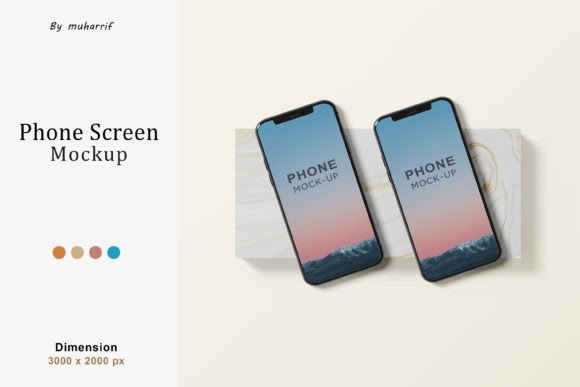
Minimal 3D Phones Mockup for Streamlined Design Workflows
The Minimal 3D Phones Mockup is a powerful design asset that simplifies the process of showcasing mobile device concepts in a professional and visually appealing way. Whether you're working on app designs, product presentations, or marketing materials, this mockup offers a flexible and efficient solution for integrating your visuals into realistic 3D phone models.
Understanding the Minimal 3D Phones Mockup
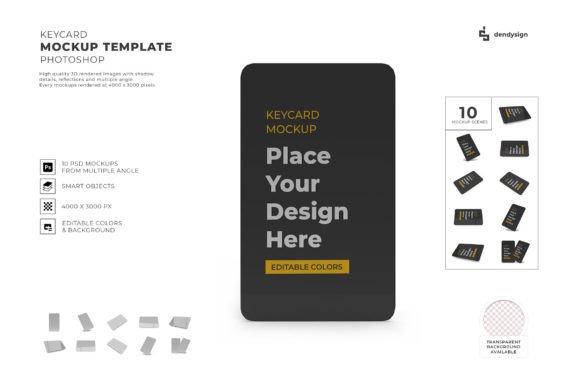
This mockup is a Photoshop PSD file designed with high-resolution specifications—3000×2000 pixels at 300 DPI. Its detailed structure allows for seamless editing within Adobe Photoshop, making it ideal for designers, marketers, and creative professionals who need to present their work with precision and clarity. The mockup includes multiple layers and smart objects, enabling users to easily replace content without altering the underlying structure.
The ability to edit via smart objects means that you can double-click on the designated layer, paste your design, and save the changes instantly. This feature significantly reduces the time and effort required to update visuals, especially when working on multiple variations or revisions.
Key Features and Customization Options
The Minimal 3D Phones Mockup comes with several customizable features that enhance its usability. One notable aspect is the option to toggle the specular effect on or off. This allows you to adjust the reflective properties of the phone’s surface, which can be particularly useful when matching the lighting conditions of your final presentation.
Additionally, the shadow overlays can be turned on or off, giving you greater control over the depth and realism of the mockup. By managing these elements separately, you can fine-tune the visual impact of your design without affecting other components.
All objects and shadows are organized into distinct layers, ensuring that you can manipulate individual elements with ease. This level of separation is essential for maintaining consistency across different projects and for quickly adapting the mockup to various use cases.
The background color is also fully customizable, allowing you to match the mockup to your brand’s aesthetic or the specific requirements of your project. This flexibility makes the mockup suitable for a wide range of applications, from digital marketing campaigns to product showcases.
Integration into Creative Workflows
The Minimal 3D Phones Mockup fits naturally into various stages of a creative workflow. Before starting a project, it can serve as a reference for visualizing how your design will appear on a mobile device. During the development phase, it can be used to test different layouts, color schemes, and user interfaces. After completion, it provides a polished way to present your work to clients, stakeholders, or audiences.
For example, a designer working on a mobile app might use the mockup to demonstrate the app’s interface on a realistic phone model. A marketer could leverage it to create compelling social media posts or email campaigns that highlight key features of a new product. In both cases, the mockup streamlines the process of communicating design ideas effectively.
Collaboration and Team Workflow
When working in a team environment, the Minimal 3D Phones Mockup can act as a shared resource that ensures consistency across different design assets. By using the same mockup template, team members can maintain a uniform look and feel, which is crucial for branding and user experience.
The editable nature of the mockup also facilitates collaboration. Team members can make adjustments independently, reducing the need for constant back-and-forth communication. This not only saves time but also improves overall efficiency, especially in fast-paced environments where quick iterations are necessary.
Preparation and Compatibility Considerations
To get the most out of the Minimal 3D Phones Mockup, it’s important to prepare your design files appropriately. Ensure that your content is formatted correctly and matches the dimensions of the mockup’s smart object layer. This will help avoid scaling issues or misalignment when the design is integrated into the model.
Compatibility with Adobe Photoshop is a key factor in the mockup’s effectiveness. While it is optimized for Photoshop, users should verify that their version of the software supports smart objects and layered editing. This ensures that all customization options are accessible and functional.
Efficiency and Long-Term Use
The Minimal 3D Phones Mockup is designed with efficiency in mind. Its clean layer structure and intuitive editing capabilities make it easy to use repeatedly across multiple projects. This is especially beneficial for professionals who frequently create mockups for different clients or products.
Over time, the mockup can become a valuable part of your design toolkit. As you refine your workflow, you may find ways to automate certain aspects of the process, such as using scripts or batch processing tools to apply consistent edits across multiple mockups. This long-term usability makes the mockup a worthwhile investment for anyone involved in digital design or product presentation.
Best Practices for Implementation
To maximize the benefits of the Minimal 3D Phones Mockup, consider implementing the following best practices:
- Organize your layers: Keep your design files structured so that you can quickly locate and modify specific elements.
- Use consistent naming conventions: Label your layers and groups clearly to improve readability and streamline collaboration.
- Test different lighting setups: Experiment with specular effects and shadow overlays to achieve the desired visual outcome.
- Backup your work: Regularly save copies of your mockups to prevent data loss and ensure continuity.
Conclusion: Enhancing Visual Communication with Minimal 3D Phones Mockup
The Minimal 3D Phones Mockup is more than just a design tool—it’s a practical solution for improving the quality and efficiency of your visual communication. By offering a high-resolution, editable, and customizable platform, it empowers designers, marketers, and creators to present their work with confidence and professionalism.
Whether you’re working on a single project or managing a portfolio of designs, the mockup’s versatility and ease of use make it an essential asset in your creative workflow. With proper preparation and implementation, it can help you achieve consistent results and elevate the impact of your visual storytelling.