How to Use Christmas 3D Patterns in Creative and Business Workflows
Christmas 3D patterns are versatile design assets that add depth, texture, and a festive touch to a wide range of projects. Whether you're crafting digital content, designing merchandise, or planning a seasonal marketing campaign, these patterns can enhance your visual output and streamline your workflow. When you visit our shop for Christmas 3D Patterns, you gain access to a collection optimized for usability and customization across multiple platforms.
Understanding the Role of Christmas 3D Patterns
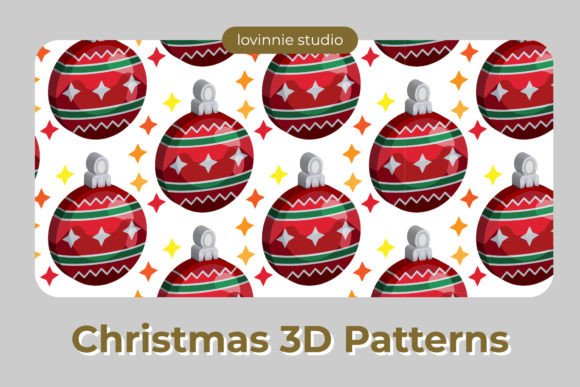
At their core, 3D patterns simulate a tactile surface with visual effects like shadows, highlights, and layers. This makes them ideal for backgrounds, product designs, illustrations, and more. Unlike flat 2D images, 3D patterns offer a sense of realism that can elevate your creative work and make it stand out during the holiday season.
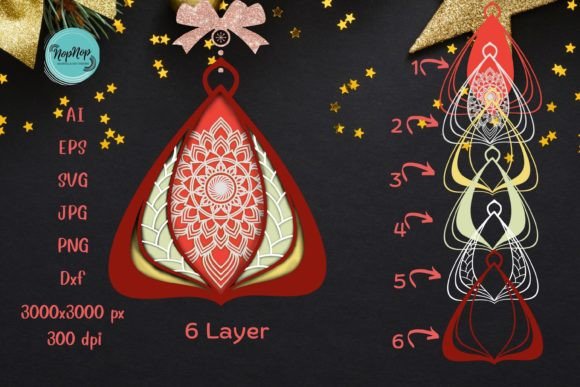
Their role is particularly significant in graphic design, web development, and print production. They can be used as overlays, textures, or standalone visuals depending on your needs. With support for six major file formats—AI, EPS, SVG, DXF, JPG, and PNG—you can easily adapt these patterns to suit both digital and physical applications.
Before the Project: Planning and Preparation
Integrating Christmas 3D patterns into your project starts with understanding your goals. Before diving into design, ask yourself what kind of impact you want to create. Are you aiming for a subtle background texture or a bold foreground element? Do you need compatibility with vector tools for scalability, or are you working with raster-based software?
When you’re preparing your project, consider the canvas size and resolution. The standard size offered in our shop is 1920 px X 1280 px, which is well-suited for most screen-based applications like website headers, social media posts, and digital banners. If you plan to use the pattern for print, ensure the final output meets the required DPI and dimensions.
Also, think about how the pattern will interact with other elements in your design. Will it clash with text or logos? Can it be layered without compromising performance? These considerations help prevent rework later in the process and save valuable time.
During the Project: Implementation and Customization
Once you've selected the right Christmas 3D Pattern from our collection, the next step is to integrate it into your existing design tools. Each format has its own advantages:
- AI (Adobe Illustrator): Best for editable vector graphics. Ideal if you plan to modify shapes or colors.
- EPS: A universal vector format that works across many design programs. Great for high-quality printing.
- SVG: Perfect for scalable web graphics. Easily embedded in HTML and CSS for responsive designs.
- DXF: Used primarily in CAD software. Suitable for laser cutting or engraving festive decorations.
- JPG & PNG: Raster formats suitable for quick use in digital media. PNGs offer transparency, making them flexible for overlay purposes.
Here’s a practical example of implementation:
- Open Adobe Illustrator and import the AI or EPS version of the pattern.
- Adjust the size and position to fit your layout. You can scale it without losing quality due to its vector nature.
- If needed, recolor or blend the pattern using layer styles or gradients to match your brand palette.
- Export the final design in the appropriate format for your intended platform—be it print, web, or video.
This process ensures that your design remains consistent and professional while leveraging the visual appeal of 3D elements. It also allows for easy reuse and adaptation across different channels.
After the Project: Reuse and Optimization
One of the key benefits of downloading Christmas 3D Patterns is their potential for long-term use. Once you’ve customized a pattern for one project, you may find it useful for others. For instance, a 3D snowflake texture could serve as a repeating background in an e-commerce site's winter sale page, or a festive wreath pattern might appear on packaging inserts for holiday gifts.
To optimize for efficiency, organize your files by type and usage. Create folders for each project or campaign, and name the files clearly so they’re easy to locate later. If you frequently use certain patterns, consider saving them as part of your personal asset library. This not only speeds up future workflows but also helps maintain brand consistency over time.
Quality Control and Compatibility
Always test your chosen 3D pattern in the environment where it will be displayed. For web use, check how it appears on different screen sizes and resolutions. For print, verify color accuracy and line clarity at the final output size. These checks are essential for ensuring the pattern performs as expected and maintains a professional appearance.
Compatibility is another factor to keep in mind. Make sure your design software supports the file format you choose. Vector formats like AI and SVG are generally more adaptable, especially when resizing or editing. However, if you're working with non-vector tools, raster formats such as JPG and PNG may be more convenient.
Real-World Applications and Use Cases
Christmas 3D patterns are not limited to a single industry or task. Below are some common use cases where they can add value:
- Marketing Campaigns: Add a 3D pattern to email templates, landing pages, or promotional banners to create a cohesive holiday theme.
- Product Packaging: Incorporate festive 3D textures into gift boxes, tags, or labels to give products a premium feel.
- Graphic Design Projects: Use them as overlays in posters, flyers, or brochures to draw attention and evoke seasonal warmth.
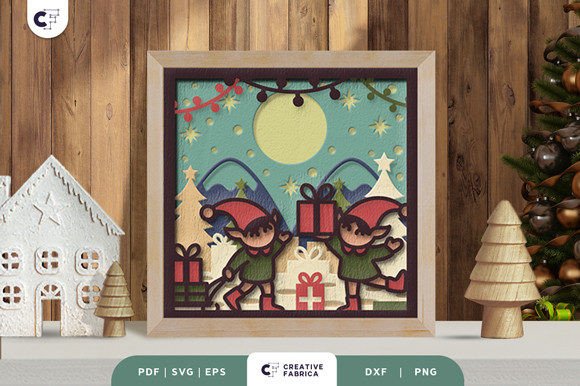
- Crafting and DIY: Hobbyists and educators can utilize DXF or SVG versions for laser-cutting holiday cards, ornaments, or home décor items.
- Website Headers and Backgrounds: SVG and PNG files are great for creating dynamic and engaging user interfaces during the December rush.
These examples highlight how a single design resource can have multiple applications, reducing the need for custom artwork creation and allowing for faster turnaround times.
Workflow Integration Tips
Smooth integration of 3D patterns into your workflow depends on organization and preparation. Here are some tips to help you maximize their utility:
- Use vector formats (AI, EPS, SVG) for maximum flexibility and scalability.
- Save original files in a central design repository for easy access and reuse.
- Establish naming conventions based on pattern type, purpose, and date of use.
- Consider creating layered PSD mockups for clients or stakeholders to visualize the pattern in context before finalizing a design.
- Test all versions (especially JPG and PNG) across platforms to confirm visual fidelity.
By treating these patterns as modular components, you can build efficient workflows that allow for rapid iteration and deployment. This is especially valuable for businesses managing multiple campaigns or creators juggling several projects at once.
Why Choose Our Christmas 3D Patterns
Our shop offers Christmas 3D Patterns that are designed with usability in mind. Every pattern is crafted to provide a realistic, eye-catching effect without being overly complex. This balance between detail and simplicity ensures that you can apply the design quickly and effectively, whether you're a seasoned designer or new to 3D effects.
Additionally, the availability of six file types means there's always an option that fits your specific needs. Need something editable for branding? Go with AI or EPS. Want something lightweight for web? Use SVG or PNG. Looking for industrial use in manufacturing? The DXF format is ready for that.
We guarantee that the design is easy to edit and customize. No matter your skill level, you’ll find the files intuitive and compatible with most modern design platforms. This makes them ideal for professionals who need to maintain deadlines and hobbyists looking for a fun way to explore festive design aesthetics.
Long-Term Value and Flexibility
Investing in high-quality 3D patterns isn’t just about immediate results—it's about building a reusable resource that can be adapted year after year. As trends evolve, you can tweak the colors, adjust the composition, or combine it with new elements to stay current without starting from scratch.
For educators, these patterns can be used in classroom materials or student projects to teach concepts like texture, contrast, and visual hierarchy. Bloggers and content creators can incorporate them into themed articles or infographics to improve engagement. Entrepreneurs and small business owners benefit from having a ready-to-use design toolkit for seasonal promotions and product launches.
Conclusion
Incorporating Christmas 3D Patterns into your creative and business processes doesn’t require a complete overhaul of your workflow. Instead, they act as valuable enhancements that bring a sense of professionalism and seasonal flair to your work. By selecting the right format, testing compatibility, and maintaining organized storage, you can leverage these patterns efficiently and consistently.
Whether you're designing for a client, running a holiday-themed blog post, or creating personalized gifts, these patterns offer a practical solution that aligns with real-world planning and execution. Their ease of use, combined with high-resolution canvases and multiple file types, makes them a reliable choice for any project involving festive design.
Thank you for considering our shop for your Christmas 3D Patterns. We hope these resources become a meaningful addition to your creative arsenal this season and beyond.